
Custom docker image
Check if Docker Installed: Ensure that Docker is installed on your system. You can verify this by running:
docker --version
Create Dockerfile:
Below is an exmaple, specific to Infoworks you need to create user 'myuser' with UID 185.
# Specify base image, example
FROM rockylinux:9
# Update the system and install necessary tools
RUN dnf -y update && \
dnf -y install epel-release && \
dnf -y install s-nail sendmail ksh fuse3 fuse3-libs curl java-1.8.0-openjdk openssh-clients gnupg2 pinentry telnet bind-utils jq sudo vi --allowerasing && \
dnf clean all && \
ln -s /usr/bin/python3 /usr/bin/python
# Add Microsoft repository and install blobfuse2
RUN sudo rpm -Uvh https://packages.microsoft.com/config/rhel/8/packages-microsoft-prod.rpm && \
dnf -y install blobfuse2
# Create user 'myuser' with UID 185
RUN useradd -u 185 -m myuser
# Install SnowSQL
RUN curl -O https://sfc-repo.snowflakecomputing.com/snowsql/bootstrap/1.3/linux_x86_64/snowflake-snowsql-1.3.0-1.x86_64.rpm && \
Build the Docker Image
docker build -t custom-bash-snowsql-openssh-azurecli-rocky:latest .
Running the Docker image locally
docker run -it --rm custom-bash-snowsql-openssh-azurecli-rocky:latest
Save the Docker Image as Tarball
docker save -o custom-bash-snowsql-openssh-azurecli-rocky.tar custom-bash-snowsql-openssh-azurecli-rocky:latest
Example : Pushing the image to Azure Container registry
# Log in to Azure ACR
az acr login --name myacr
# Tag the image for ACR
docker tag custom-bash-snowsql-openssh-azurecli-rocky:latest myacr.azurecr.io/custom-bash-snowsql-openssh-azurecli-rocky:latest
# Push the image to ACR
docker push myacr.azurecr.io/custom-bash-snowsql-openssh-azurecli-rocky:latest
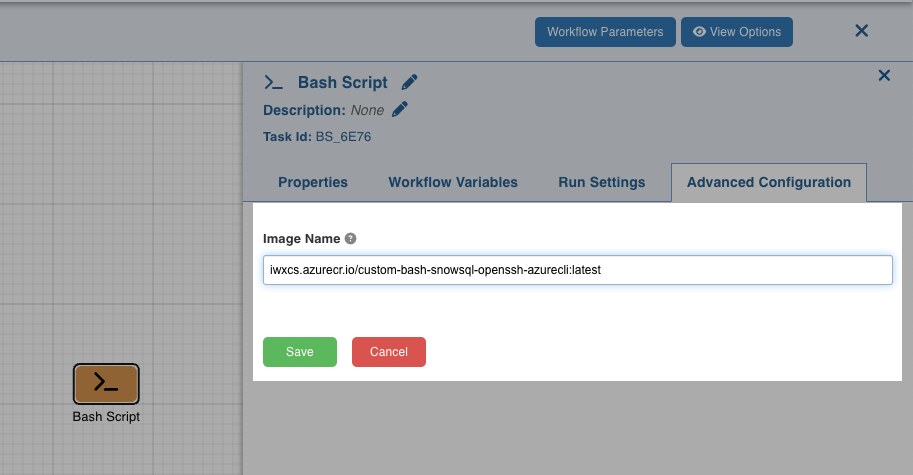
Configuring Custom docker image for Workflow bash script
Refer : <https://docs.infoworks.io/operationalize-data/designing-workflow#bash-scripts-in-kubernetes-using-custom-images>
Was this page helpful?