
A pipeline allows you to transform the data ingested by Infoworks for various purposes like consumption by analytics tools, export to other systems, etc.
You can perform either of the following:
Import a Pipeline SQL or
Create a New pipeline
NOTE There are two types of pipelines, namely: Visual Pipeline and SQL Pipeline. For your convenience, whenever the generic keyword “Pipeline” is used in the document, it specifically refers to Visual Pipeline.
NOTE The SQL Pipeline feature is available for Execution type Snowflake, BigQuery and Databricks SQL.
Importing a Pipeline SQL
For details on importing a pipeline SQL, see Importing SQL.
Creating a New Pipeline
Prerequisite Ensure a domain is available. For details on creating a domain, see Managing Domains.
Following are the steps to add a new pipeline to the domain:
Click the Domains menu and click the required domain from the list. You can also search for the required domain.
Click the Pipelines icon.
In the Pipelines page, click the New Pipeline button.
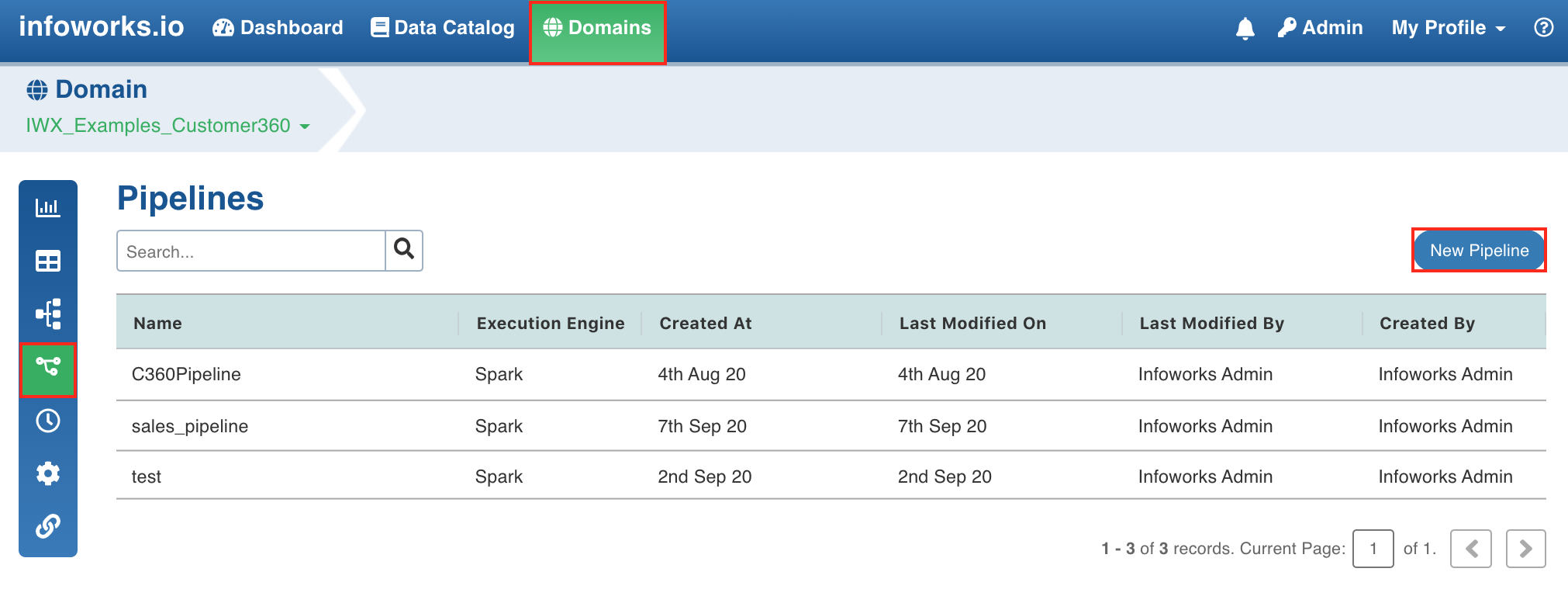
In the New Pipeline page, select Create new pipeline in the drop-down list.
NOTE To create a duplicate of an existing pipeline, select the pipeline from the Duplicate Existing Pipeline drop-down list and enable the checkbox to retain properties such as target table name, target schema name, target HDFS location, analytics model name, analytics model HDFS location, MapR-DB table path in import.
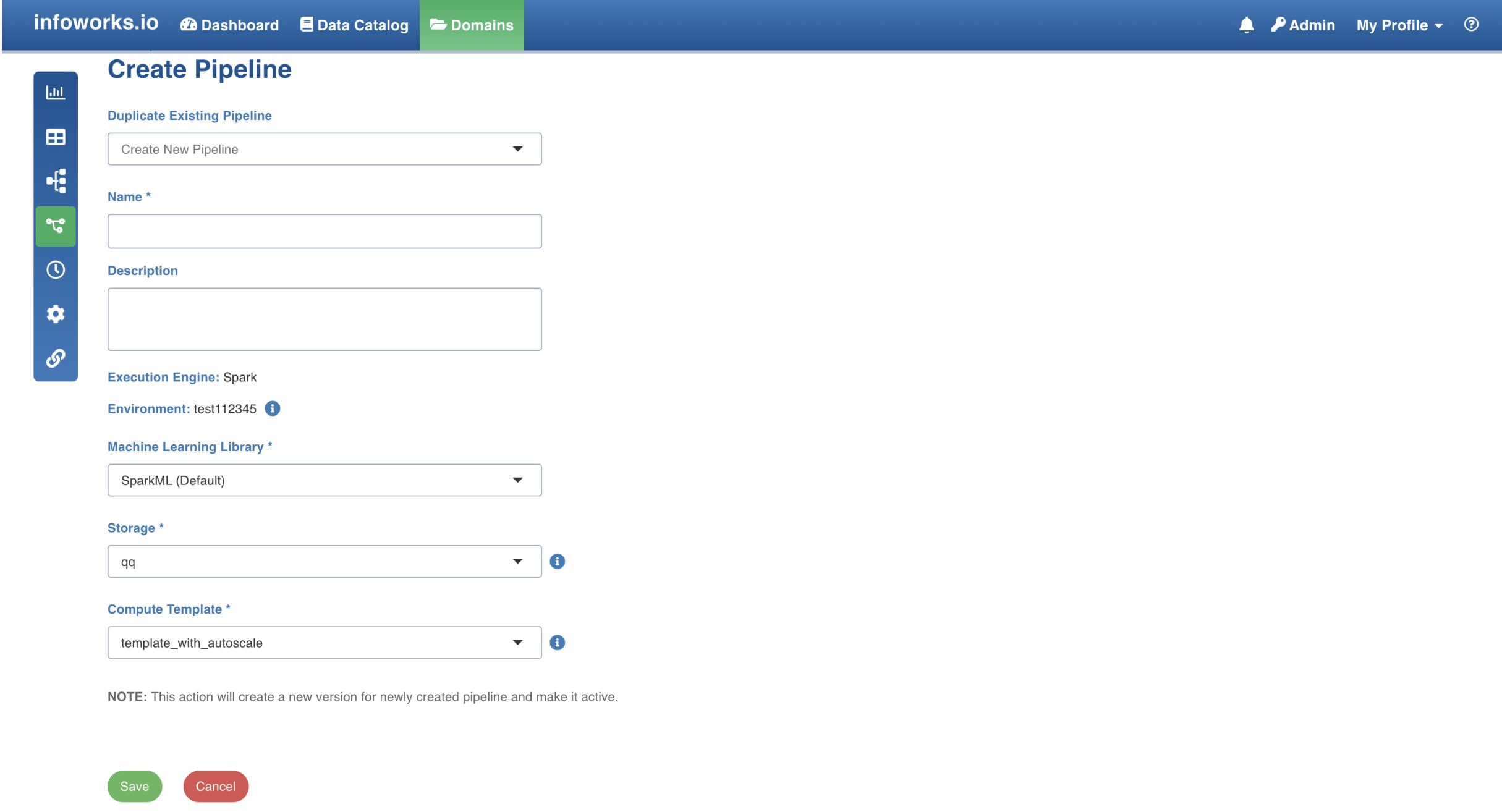
Enter the following details:
Field | Description | Details |
|---|---|---|
Name | The name for the pipeline. | Enter a unique name for the pipeline. |
Description | The description for the pipeline. | Enter a description for the pipeline. |
Execution Engine | The execution engine to communicate with Hadoop daemons such as Name node, Data nodes, and job tracker to execute the Hive query on top of Hadoop file system. | Select the Execution Engine as Spark. |
Environment | The environment selected while creating the corresponding domain. | This is auto-assigned. |
Machine Learning Library | The library used in machine learning. | The options include SparkML and H2O. |
Storage | This drop-down lists the storages created by the admin. | For details on storage, see Configuring and Managing Environments. |
Cluster Templates | This drop-down lists the cluster templates created by the admin. | For details on creating cluster, see Configuring and Managing Environments. |
For Spark with Unity catalog enabled environment, below are the additional mandatory fields:
Field | Description | Details |
|---|---|---|
Catalog Name | Catalog name if the environment is unity enabled | Enter the details of the catalog name |
Staging Catalog Name | Staging catalog name for storing the temporary table | Enter the details of the staging catalog name |
Staging Schema Name | Staging schema name for storing the temporary table | Enter the details of the staging schema name |
NOTE Infoworks will not create a staging catalog and staging schema if it does not exist. Only target catalog and target schema will be created when not present.
For Domains with Snowflake environment, enter the following details:
Field | Description | Details |
|---|---|---|
Name | The name for the pipeline. | Enter a unique name for the pipeline. |
Description | The description for the pipeline. | Enter a description for the pipeline. |
Execution Engine | The execution engine to communicate with Hadoop daemons such as Name node, Data nodes, and job tracker to execute the Hive query on top of Hadoop file system. | This is auto-assigned. |
Data Environment | Select from a list of snowflake environments associated with the corresponding domain. | Select the required environment. The environment selection is disabled if you clone an existing pipeline. The cloned pipeline is defaulted to use the same environment as configured in the original pipeline. |
Run driver job on data plane | Select this checkbox to run the job on data plane. NOTE: The driver job runs on control plane by default. | Not selecting the check box implies that the job will run on control pane. |
Compute Cluster | The compute cluster that is spin up for each table. | Select the relevant compute cluster from the dropdown list. |
Snowflake Warehouse | Snowflake warehouse name. | Snowflake Warehouse drop-down will appear based on the selected snowflake profile. |
Snowflake Profile | Snowflake profile name. | Snowflake Profile drop-down will appear for the selected snowflake environment. |
For Domains with BigQuery environment, enter the following details:
Field | Description | Details |
|---|---|---|
Name | The name for the pipeline. | Enter a unique name for the pipeline. |
Description | The description for the pipeline. | Enter a description for the pipeline. |
Execution Engine | The execution engine to communicate with Hadoop daemons such as Name node, Data nodes, and job tracker to execute the Hive query on top of Hadoop file system. | This is auto-assigned. |
Data Environment | Select from a list of bigquery environments associated with the corresponding domain. | Select the required environment. The environment selection is disabled if you clone an existing pipeline. The cloned pipeline is defaulted to use the same environment as configured in the original pipeline. |
Run driver job on data plane | Select this checkbox to run the job on data plane. NOTE The driver job runs on control plane by default. | Not selecting the check box implies that the job will run on control pane. |
Compute Cluster | The compute cluster that is spin up for each table. | If the Run driver job on data plane checkbox is selected, then you can select the Compute Cluster from the list of available compute clusters in the data environment. |
Custom Tags | Tags are metadata elements that you apply to your cloud resources. They're key-value pairs that help you identify resources based on settings that are relevant to your organization. | |
BigQuery Labels | This label enables you to add labels to your tables in BigQuery | For more information, refer to BigQuery Labels. |
For Domains with Databricks SQL execution environment, enter the following details:
Field | Description | Details |
|---|---|---|
Name | The name for the pipeline. | Enter a unique name for the pipeline. |
Description | The description for the pipeline. | Enter a description for the pipeline. |
Execution Engine | The execution engine to communicate with Hadoop daemons such as Name node, Data nodes, and job tracker to execute the Hive query on top of Hadoop file system. | Select the Execution Engine as Databricks SQL. |
Environment | The environment selected while creating the corresponding domain. | This is auto-assigned. |
Databricks Warehouse | Databricks warehouse name. | Databricks Warehouse drop-down will appear. |
Storage | This drop-down lists the storages created by the admin. | For details on storage, see Configuring and Managing Environments. |
Cluster Templates | This drop-down lists the cluster templates created by the admin. | For details on creating clusters, see Configuring and Managing Environments. |
NOTE Pipeline created in Databricks SQL are compatible with Spark Execution Type and can be changed later in the pipeline settings page.
Click Save. The new pipeline will be added to the list of pipelines.
Limitation
The H2O machine learning library is not supported in interactive mode.
NOTE If you are creating a pipeline for the first time, it will be a Visual Pipeline by default. To create the SQL Pipeline, refer to Creating a New Pipeline Version.
Using Spark
Currently, v2.0 and higher versions of Spark are supported. Spark as execution engine uses the Hive metastore / unity catalog to store metadata of tables. All the nodes supported by Hive and Impala are supported by the Spark engine.
NOTE Unity Catalog is only supported for unity catalog enabled data environments.
For Spark with Unity catalog enabled environment, below are the additional mandatory fields:
Limitations of Spark
Parquet causes issues with the decimal datatype. This affects the pipeline targets that include the decimal datatype. You are recommended to cast any decimal datatype to double when using in a pipeline target.
The number of tasks for the reduce phase can be tuned using the sql.shuffle.partitions setting. This setting controls the number of files and can be tuned per pipeline using the dt_batch_sparkapp_settings configuration in the Advanced Configuration option.
Column names with spaces are not supported in Spark v2.2 but supported in v2.0. For example, column name as ID Number is not supported in Spark v2.2.
Pipeline Audits

Pipeline auditing is available at two levels:
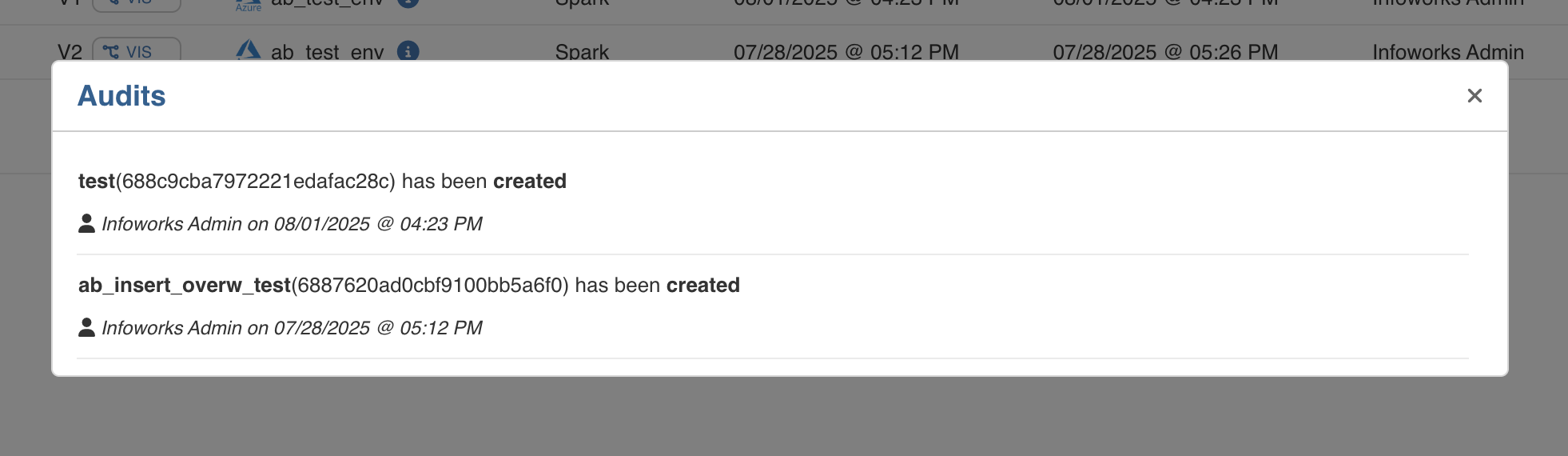
Global Pipeline Audit
At the global level, the audit logs capture key pipeline-level events such as:
Pipeline creation
Pipeline updates
Job submissions for deletion
These events are accessible via the “View Audits” button at the top right in the pipelines tab.
Individual Pipeline Audit
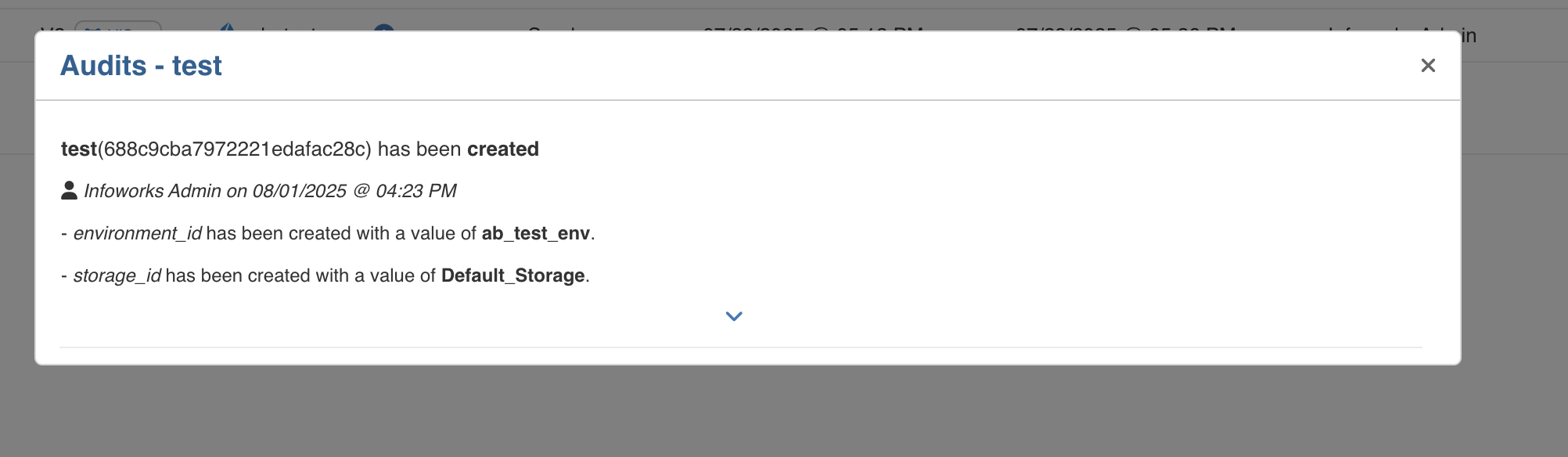
Each pipeline also has its own detailed audit trail. This includes:
Field-level tracking for all creates, updates, and deletes operations
Capturing what specific values were added, modified, or removed from individual fields
This audit trail can be accessed by clicking on the circular arrow icon in that specific pipeline in the pipelines tab.
Best Practices
For best practices, see General Guidelines on Data Pipelines.