
Additional Functionalities
RDBMS Ingestion
Title
Message
Create new category
What is the title of your new category?
Edit page index title
What is the title of the page index?
Edit category
What is the new title of your category?
Edit link
What is the new title and URL of your link?
Setting Advanced Configurations
Copy Markdown
Open in ChatGPT
Open in Claude
Setting Source-Level Configurations
Following are the steps to set advanced configuration for a source:
- Click the Data Catalog menu and click Ingest for the required source.
$inline[badge,NOTE,primary] For an already ingested table, click the View Source button.
- Click the Source Setup tab and scroll down to the Advanced Configuration section.
- Click Add Configuration.
- Enter key, value, and description. You can also select the configuration from the list that appears.
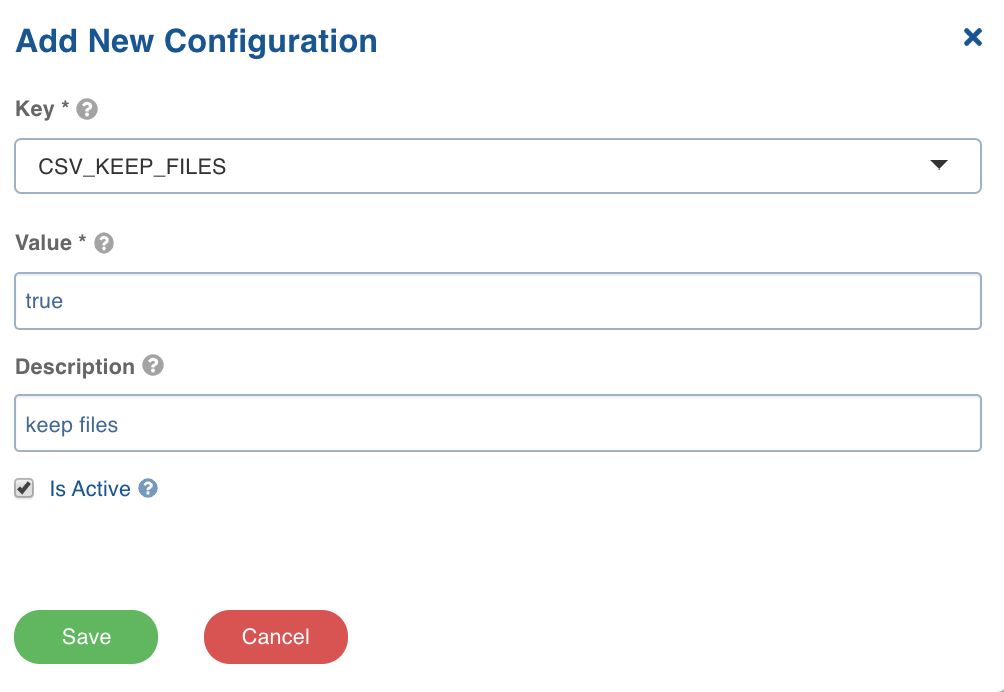
- Click Save.
Setting Table-Level Configurations
Following are the steps to set advanced configuration for a table:
- Click the Data Catalog menu and click Ingest for the required source.
$inline[badge,NOTE,primary] For an already ingested table, click View Source, click the Tables tab, click Configure for the required table and click the Advanced Configuration tab.
__ 2. Click the Configure Tables tab, click the Advanced Configuration tab and click Add Configuration.
- Enter key, value, and description. You can also select the configuration from the list that appears.
VariableType to search · ESC to discard
GlossaryType to search · ESC to discard
InsertType to search · ESC to discard
No matches
Last updated on Oct 29, 2021
Was this page helpful?
Next to read:
Setting Ingestion Notification ServicesFor more details, refer to our Knowledge Base and Best Practices!
For help, contact our support team!
© UNIPHORE TECHNOLOGIES 2025 | Confidential
Discard Changes
Do you want to discard your current changes and overwrite with the template?
Archive Synced Block
Message
Create new Template
What is this template's title?
Delete Template
Message
On This Page